
 路由网关-Netflix Zuul
# 路由网关-Netflix Zuul
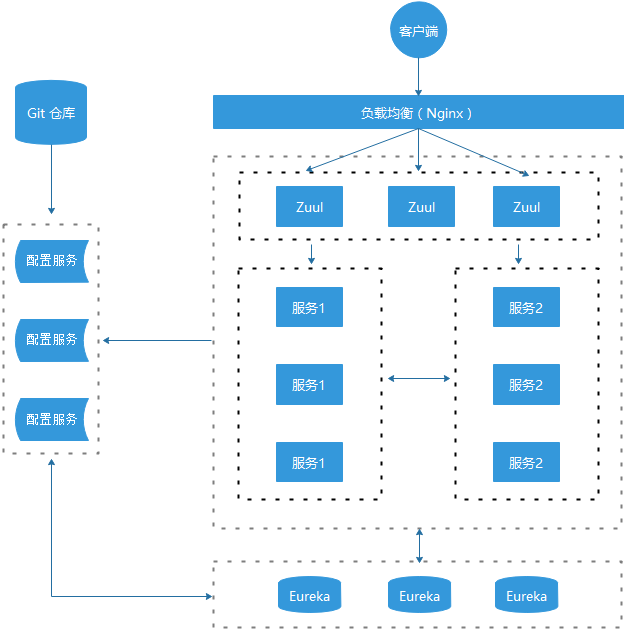
在微服务架构中,需要几个基础的服务治理组件,包括服务注册与发现、服务消费、负载均衡、熔断器、智能路由、配置管理等,这些基础组件相互协作,共同组建了一个简单的微服务系统(如下图)。
在 Spring Cloud 微服务系统中,一种常见的负载均衡方式是,客户端的请求首先经过负载均衡(Zuul、Ngnix),再到达服务网关(Zuul 集群),然后再到具体的服。服务统一注册到高可用的服务注册中心集群,服务的所有的配置文件由配置服务管理,配置服务的配置文件放在 GIT 仓库,方便开发人员随时改配置。
# Netflix Zuul 简介
Netflix Zuul 旨在实现动态路由,监视,弹性和安全性。Zuul 包含了对请求的路由和过滤两个最主要的功能。路由功能是微服务的一部分,比如 /api/user 转发到到 User 服务,/api/shop 转发到到 Shop 服务,简单来说网关统一管理了访问接口。
Zuul 是 Netflix 开源的微服务网关,它可以和 Eureka、Ribbon、Hystrix 等组件配合使用。Zuul 的核心是一系列的过滤器,这些过滤器可以完成以下功能:
- 身份认证与安全:识别每个资源的验证要求,并拒绝那些与要求不符的请求
- 审查与监控:在边缘位置追踪有意义的数据和统计结果,从而带来精确的生产试图
- 动态路由:动态地将请求路由到不同的后端集群
- 压力测试:逐渐增加只想集群的流量,以了解性能
- 负载分配:为每一种负载类型分配对应容量,并弃用超出限定值的请求
- 静态响应处理:在边缘位置直接建立部份响应,从而避免其转发到内部集群\
- 多区域弹性:跨越AWS Region进行请求路由,旨在实现ELB(Elastic Load Balancing)使用的多样化,以及让系统的边缘更贴近系统的使用者
Spring Cloud 对 Netflix Zuul 进行二次基于 Spring Boot 的注解式封装做到开箱即用。目前来说,结合 Sring Cloud 提供的服务治理体系,可以做到请求转发,根据配置或者默认的路由规则进行路由和 Load Balance,无缝集成 Hystrix。
# 创建路由网关项目
网关可以有多种技术选型,例如Netflix Zuul,Spring Cloud Gateway等;也可以针对不同的场景对网关分类,例如对内的网关,对外的网关,针对某种业务类型的网关,开发平台的网关等。(在项目管理上,可以更细分)
这里简单创建一个名为 hello-spring-cloud-netflix-zuul 的项目,使用 zuul 实现网关:
# POM
<?xml version="1.0" encoding="UTF-8"?>
<project xmlns="http://maven.apache.org/POM/4.0.0" xmlns:xsi="http://www.w3.org/2001/XMLSchema-instance"
         xsi:schemaLocation="http://maven.apache.org/POM/4.0.0 https://maven.apache.org/xsd/maven-4.0.0.xsd">
    <modelVersion>4.0.0</modelVersion>
    <parent>
        <groupId>com.example</groupId>
        <artifactId>hello-spring-cloud-netflix-dependencies</artifactId>
        <version>1.0.0-SNAPSHOT</version>
        <relativePath>../hello-spring-cloud-netflix-dependencies/pom.xml</relativePath>
    </parent>

    <artifactId>hello-spring-cloud-netflix-zuul</artifactId>
    <packaging>jar</packaging>

    <dependencies>
      	<!-- Spring Boot Begin -->
        <dependency>
            <groupId>org.springframework.boot</groupId>
            <artifactId>spring-boot-starter-test</artifactId>
            <scope>test</scope>
        </dependency>
        <!-- Spring Boot End -->

        <!-- Spring Cloud Begin -->
        <dependency>
            <groupId>org.springframework.cloud</groupId>
            <artifactId>spring-cloud-starter-netflix-eureka-server</artifactId>
        </dependency>
        <dependency>
            <groupId>org.springframework.cloud</groupId>
            <artifactId>spring-cloud-starter-netflix-zuul</artifactId>
        </dependency>
        <!-- Spring Cloud End -->
    </dependencies>

    <build>
        <plugins>
            <plugin>
                <groupId>org.springframework.boot</groupId>
                <artifactId>spring-boot-maven-plugin</artifactId>
                <configuration>
                    <mainClass>com.example.hello.spring.cloud.netflix.zuul.ZuulApplication</mainClass>
                </configuration>
            </plugin>
        </plugins>
    </build>

</project>
# Application
程序入口类需要配置@EnableDiscoveryClient注册服务到Eureka以及配置 @EnableZuulProxy 注解开启 Zuul 功能。
package com.example.hello.spring.cloud.netflix.zuul;

import org.springframework.boot.SpringApplication;
import org.springframework.boot.autoconfigure.SpringBootApplication;
import org.springframework.cloud.client.discovery.EnableDiscoveryClient;
import org.springframework.cloud.netflix.zuul.EnableZuulProxy;

@SpringBootApplication
@EnableZuulProxy
@EnableDiscoveryClient
public class ZuulApplication {

    public static void main(String[] args) {
        SpringApplication.run(ZuulApplication.class, args);
    }

}
# application.yml
除了常规的SpringBoot配置外,主要是增加了 Zuul 配置:
spring:
  application:
    name: hello-spring-cloud-netflix-zuul

server:
  port: 8181

eureka:
  instance:
    hostname: localhost
  client:
    serviceUrl:
      defaultZone: http://${eureka.instance.hostname}:8761/eureka/

zuul:
  routes:
    api-consumer-feign:
      path: /api/consumer/feign/**
      serviceId: hello-spring-cloud-netflix-consumer-feign
    api-consumer-ribbon:
      path: /api/consumer/ribbon/**
      serviceId: hello-spring-cloud-netflix-consumer-ribbon
路由说明:
- 以
/api/consumer/feign/开头的请求都转发给hello-spring-cloud-netflix-consumer-feign服务 - 以
/api/consumer/ribbon/开头的请求都转发给hello-spring-cloud-netflix-consumer-ribbon服务
# 测试访问
依次启动完相关服务后,通过网关服务去访问消费者的接口:
打开浏览器访问:http://localhost:8181/api/consumer/feign/hi?msg=HelloZuul,浏览器显示
Hi,your message is : HelloZuul i am from port : 8762打开浏览器访问:http://localhost:8181/api/consumer/ribbon/hi?message=HelloZuul ,浏览器显示
Hi,your message is : null i am from port : 8762