
 服务消费者 - Ribbon
# 服务消费者 - Ribbon
# 概述
在微服务架构中,业务都会被拆分成一个独立的服务,服务与服务的通讯基于多种跨进程的方式进行通信协作,而在Spring Cloud架构中比较常见的跨进程的方式是RESTful HTTP请求和RPC调用。这两种方式的实现方案有:
- RESTful HTTP请求:Ribbon + RestTemplate,
- RPC调用:Feign。
在这一篇文章首先讲解下基于 Ribbon + RestTemplate。
# Ribbon简介
Ribbon 是Netflix发布的负载均衡器,是一个客户端实现负载均衡处理的服务调用组件。它有助于控制HTTP和TCP的客户端的行为。为Ribbon配置服务提供者地址后,Ribbon就可基于某种负载均衡算法,自动地帮助服务消费者去请求。Ribbon默认为我们提供了很多负载均衡算法,例如轮询、随机等。当然,我们也可为Ribbon实现自定义的负载均衡算法。
在Spring Cloud中,当Ribbon与Eureka配合使用时,Ribbon可自动从Eureka Server获取服务提供者地址列表,并基于负载均衡算法,请求其中一个服务提供者实例。
Ribbon的负载均衡主要是通过LoadBalancerClient来实现的,而LoadBalancerClient具体交给了ILoadBalancer来处理,ILoadBalancer通过配置IRule、IPing等,向Eureka Server获取注册列表信息,默认每10秒向Eureka Server发送一次“ping”,进而检查是否需要更新服务的注册列表信息。最后,在得到服务注册列表信息后,ILoadBalancer根据IRule的策略进行负载均衡。而RestTemplate加上@LoadBalanced注解后,在远程调度时能够负载均衡,主要维护了一个被@LoadBalanced注解的RestTemplate列表,并给该列表中的RestTemplate对象添加了拦截器。在拦截器的方法中,将远程调度方法交给了Ribbon的负载均衡器LoadBalancerClient去处理,从而达到了负载均衡的目的。
# 演示案例方案
- 一个服务注册中心,Eureka Server,端口号为:
8761 - 运行了两个服务提供者(
hello-spring-cloud-netflix-provider)实例,端口号分别为:8762,8763 - 运行了一个服务消费者(
hello-spring-cloud-netflix-consumer-ribbon),端口号为:8764 - 服务消费者通过
RestTemplate调用服务提供者接口时因为启用了负载均衡功能,故会轮流调用两个服务提供者,请求接口结果反复依次显示8762和8763端口
# 服务提供者集群
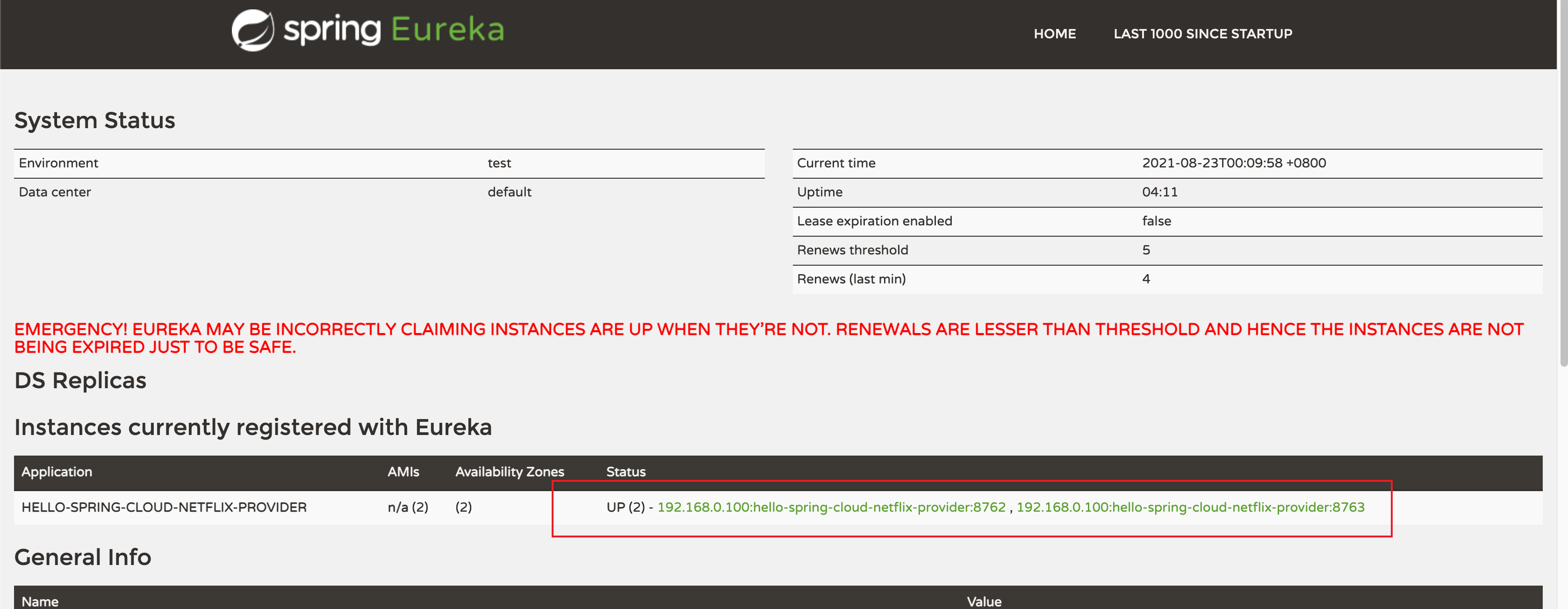
启动两个服务提供者(hello-spring-cloud-netflix-provider),端口分别为:8762、8763,启动后在 Eureka 中会注册两个实例,这相当于一个小集群
在 IDEA 中配置一个工程启动多个实例:
- 点击
Run -> Edit Configurations... - 选择需要启动多实例的项目,旧版本的IDEA去掉
Single instance only前面的勾,新版本的勾选Allow parallel run。 - 通过修改
application.yml配置文件的server.port的端口,启动多个实例,需要多个端口,分别进行启动即可。
# 创建服务消费者
创建一个工程名为 hello-spring-cloud-netflix-consumer-ribbon 的服务消费者项目,目的通过Ribbon + RestTemplate的方式调用服务提供者的http://hello-spring-cloud-netflix-provider:8762/hi?msg=HelloProvider接口,并能够体现Ribbon的负载均衡机制。
# POM
pom.xml 配置如下:
<?xml version="1.0" encoding="UTF-8"?>
<project xmlns="http://maven.apache.org/POM/4.0.0" xmlns:xsi="http://www.w3.org/2001/XMLSchema-instance"
         xsi:schemaLocation="http://maven.apache.org/POM/4.0.0 http://maven.apache.org/xsd/maven-4.0.0.xsd">
    <modelVersion>4.0.0</modelVersion>

    <parent>
        <groupId>com.example</groupId>
        <artifactId>hello-spring-cloud-netflix-dependencies</artifactId>
        <version>1.0.0-SNAPSHOT</version>
        <relativePath>../hello-spring-cloud-netflix-dependencies/pom.xml</relativePath>
    </parent>

    <artifactId>hello-spring-cloud-netflix-consumer-ribbon</artifactId>
    <packaging>jar</packaging>

    <dependencies>
        <!-- Spring Boot Begin -->
        <dependency>
            <groupId>org.springframework.boot</groupId>
            <artifactId>spring-boot-starter-web</artifactId>
        </dependency>
        <dependency>
            <groupId>org.springframework.boot</groupId>
            <artifactId>spring-boot-starter-tomcat</artifactId>
        </dependency>
        <dependency>
            <groupId>org.springframework.boot</groupId>
            <artifactId>spring-boot-starter-thymeleaf</artifactId>
        </dependency>
        <dependency>
            <groupId>org.springframework.boot</groupId>
            <artifactId>spring-boot-starter-actuator</artifactId>
        </dependency>
        <dependency>
            <groupId>org.springframework.boot</groupId>
            <artifactId>spring-boot-starter-test</artifactId>
            <scope>test</scope>
        </dependency>
        <!-- Spring Boot End -->

        <!-- Spring Cloud Begin -->
        <dependency>
            <groupId>org.springframework.cloud</groupId>
            <artifactId>spring-cloud-starter-netflix-eureka-server</artifactId>
        </dependency>

        <dependency>
            <groupId>org.springframework.cloud</groupId>
            <artifactId>spring-cloud-starter-netflix-ribbon</artifactId>
        </dependency>

        <!-- Spring Cloud End -->

        <!-- 解决 thymeleaf 模板引擎一定要执行严格的 html5 格式校验问题 -->
        <dependency>
            <groupId>net.sourceforge.nekohtml</groupId>
            <artifactId>nekohtml</artifactId>
        </dependency>
    </dependencies>

    <build>
        <plugins>
            <plugin>
                <groupId>org.springframework.boot</groupId>
                <artifactId>spring-boot-maven-plugin</artifactId>
                <configuration>
                    <mainClass>com.example.hello.spring.cloud.netflix.consumer.ribbon.RibbonConsumerApplication</mainClass>
                </configuration>
            </plugin>
        </plugins>
    </build>
</project>
这里将该服务当成了拥有页面的Web服务,引入了一些模版引擎的依赖,其实主要是增加了spring-cloud-starter-netflix-ribbon的依赖。
# Application
由于是消费者,需要开启 @EnableDiscoveryClient 配置,让消费者去到Eureka Server发现服务。是不需要@EnableEurekaServer和@EnableEurekaClient的,注意区分他们之间的作用。
package com.example.hello.spring.cloud.netflix.consumer.ribbon;

import org.springframework.boot.SpringApplication;
import org.springframework.boot.autoconfigure.SpringBootApplication;
import org.springframework.cloud.client.discovery.EnableDiscoveryClient;

@SpringBootApplication
@EnableDiscoveryClient
public class RibbonConsumerApplication {

    public static void main(String[] args) {
        SpringApplication.run(RibbonConsumerApplication.class, args);
    }

}
# application.yml
配置Eureka Server地址,设置程序端口号为:8764
spring:
  application:
    name: hello-spring-cloud-netflix-consumer-ribbon
  thymeleaf:
    cache: false
    mode: LEGACYHTML5
    encoding: UTF-8
    servlet:
      content-type: text/html

server:
  port: 8764

eureka:
  client:
    serviceUrl:
      defaultZone: http://localhost:8761/eureka/
# Configuration
编写ConfigurationBean,配置注入 RestTemplate 的 Bean,并通过 @LoadBalanced 注解表明开启负载均衡功能:
package com.example.hello.spring.cloud.netflix.consumer.ribbon.config;

import org.springframework.cloud.client.loadbalancer.LoadBalanced;
import org.springframework.context.annotation.Bean;
import org.springframework.context.annotation.Configuration;
import org.springframework.web.client.RestTemplate;

@Configuration
public class RestTemplateConfiguration {

    @Bean
    @LoadBalanced
    public RestTemplate restTemplate() {
        return new RestTemplate();
    }

}
# ServiceTest
在这里,我们将服务提供者提供的接口封装在一个Service,注意的是我们用的服务名hello-spring-cloud-netflix-provider替代了具体的 URL 地址,在 Ribbon 中它会根据服务名来选择具体的服务实例,在请求的时候会根据服务实例用具体的 URL 替换掉服务名去请求:
package com.example.hello.spring.cloud.netflix.consumer.ribbon.service;

import org.springframework.beans.factory.annotation.Autowired;
import org.springframework.stereotype.Service;
import org.springframework.web.client.RestTemplate;

@Service
public class ProviderService {

    @Autowired
    private RestTemplate restTemplate;

    public String sayHi(String msg) {
        return restTemplate.getForObject("http://hello-spring-cloud-netflix-provider/hi?msg=" + msg, String.class);
    }

}
# ControllerTest
package com.example.hello.spring.cloud.netflix.consumer.ribbon.ctrl;

import com.example.hello.spring.cloud.netflix.consumer.ribbon.service.ProviderService;
import org.springframework.beans.factory.annotation.Autowired;
import org.springframework.web.bind.annotation.GetMapping;
import org.springframework.web.bind.annotation.RequestParam;
import org.springframework.web.bind.annotation.RestController;

@RestController
public class RibbonConsumerCtrl {

    @Autowired
    private ProviderService providerService;

    @GetMapping(value = "hi")
    public String sayHi(@RequestParam(value = "msg", required = false) String msg) {
        return providerService.sayHi(msg);
    }

}
# 测试访问
在浏览器上多次访问 http://localhost:8764/hi?msg=HelloRibbon
浏览器交替显示:
Hi,your message is :"HelloRibbon" i am from port:8762
Hi,your message is :"HelloRibbon" i am from port:8763
请求成功则表示我们已经成功通过Ribbon + RestTemplate实现了负载均衡访问不同端口的实例。